Introduction to Indexing Errors
In Search Engine Optimization (SEO), indexing plays a crucial role in determining whether your website pages appear in search engine results or not. Even if your content is high quality and well-optimized, it will not rank on Google if it is not indexed. This is where indexing errors become a serious problem for website owners and SEO professionals.
An indexing error occurs when search engines like Google fail to crawl or store your web pages in their index. These errors can negatively affect your website’s visibility, organic traffic, and overall SEO performance. Understanding indexing errors, their causes, and how to fix them is essential for long-term SEO success.
What Is Indexing in SEO?
Indexing is the process by which search engines store and organize web pages after crawling them. When Googlebot crawls your website, it analyzes the content, links, images, and structure. If the page meets Google’s quality and technical requirements, it gets added to Google’s index.
Only indexed pages are eligible to appear in search results. If a page is not indexed, it does not matter how good your SEO strategy is—users will never find that page through search engines.
What Are Indexing Errors?
Indexing errors are issues that prevent search engines from properly indexing your web pages. These errors can occur due to technical problems, incorrect configurations, poor website structure, or server-related issues.
Google usually reports indexing errors in Google Search Console, where website owners can monitor which pages are indexed and which ones are excluded due to errors.
Why Indexing Errors Are Harmful for SEO
Indexing errors can seriously damage your SEO performance in the following ways:
-
Important pages may not appear in search results
-
Organic traffic may drop significantly
-
Crawl budget may be wasted on unimportant pages
-
Website authority and rankings may decline
-
New content may take longer to appear on Google
Fixing indexing errors ensures that search engines can easily discover, crawl, and index your content.
Common Types of Indexing Errors
Crawled – Currently Not Indexed
This error means Google has crawled the page but decided not to index it. This often happens due to thin content, duplicate content, or low-quality pages.
Solution:
Improve content quality, add unique information, and ensure the page provides real value to users.
Discovered – Currently Not Indexed
Google knows about the page but has not crawled it yet. This usually occurs due to crawl budget limitations or server performance issues.
Solution:
Improve site speed, internal linking, and ensure your server can handle Googlebot requests.
Page with Redirect
This happens when a page redirects to another URL, and Google indexes the final destination instead.
Solution:
Ensure redirects are correct (301 preferred) and avoid unnecessary redirect chains.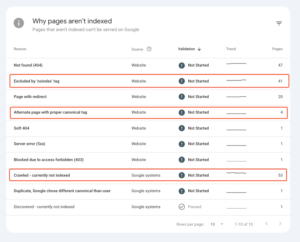
Duplicate Content (Without User-Selected Canonical)
When Google finds multiple pages with similar content and cannot identify the main version, it may not index all of them.
Solution:
Use canonical tags correctly and avoid creating duplicate URLs.
Blocked by robots.txt
If a page is blocked in the robots.txt file, Google cannot crawl or index it.
Solution:
Check your robots.txt file and remove unnecessary disallow rules for important pages.
Noindex Tag Applied
A page with a “noindex” meta tag tells search engines not to index it.
Solution:
Remove the noindex tag if the page should appear in search results.
Soft 404 Errors
Soft 404 errors occur when a page looks like an error page but returns a 200 status code.
Solution:
Return proper 404 status codes or improve the page content.
Server Errors (5xx)
Server errors occur when your server fails to respond to Googlebot requests.
Solution:
Fix hosting issues, increase server resources, and ensure stable uptime.
How to Check Indexing Errors
The best way to identify indexing errors is through Google Search Console.
Steps:
-
Open Google Search Console
-
Go to the “Pages” or “Indexing” report
-
Review indexed, excluded, and error pages
-
Click on each error to see affected URLs
Google Search Console provides detailed reasons why a page is not indexed and suggestions to fix the problem.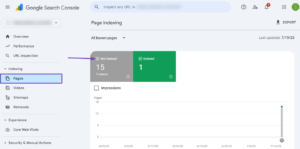
How to Fix Indexing Errors Effectively
Improve Content Quality
Google prefers high-quality, original, and useful content. Thin or copied content often leads to indexing issues. Always focus on user intent and add value.
Optimize Internal Linking
Internal links help Google discover important pages. Pages with no internal links are harder to crawl and index.
Submit XML Sitemap
An XML sitemap helps search engines understand your website structure and find new pages faster.
Make sure:
-
Sitemap is updated
-
Submitted in Google Search Console
-
Contains only important URLs
Fix Technical SEO Issues
Technical issues like broken links, slow page speed, and improper redirects can cause indexing errors. Conduct regular technical SEO audits.
Use URL Inspection Tool
Google Search Console’s URL Inspection Tool allows you to:
-
Check indexing status
-
Request indexing
-
See crawl issues
This tool is extremely helpful for newly published or updated pages.
Improve Website Performance
A slow website discourages search engine crawling. Optimize images, enable caching, and use a reliable hosting provider.
Indexing Errors vs Crawling Errors
Many people confuse indexing errors with crawling errors.
-
Crawling errors occur when Google cannot access a page
-
Indexing errors occur when Google decides not to store the page
Both issues are important, but indexing errors directly affect visibility in search results.
Best Practices to Avoid Indexing Errors
-
Publish high-quality, unique content
-
Avoid duplicate URLs
-
Use canonical tags properly
-
Keep robots.txt clean
-
Maintain fast page load speed
-
Regularly monitor Google Search Console
Following these best practices reduces the chances of indexing problems in the future.
Conclusion
Indexing errors are one of the most common yet overlooked SEO problems. If your pages are not indexed, your SEO efforts will not produce results, no matter how well-optimized your content is. By understanding the types of indexing errors, monitoring Google Search Console, and fixing technical and content-related issues, you can significantly improve your website’s visibility and rankings.
Regular SEO audits, high-quality content, and proper technical setup are essential for preventing indexing errors and ensuring long-term success in search engine optimization.
2 Responses
[…] Sitemap.xml is a critical SEO tool that helps search engines crawl and index your website efficiently. While it doesn’t guarantee rankings, it significantly improves discoverability, […]
[…] mobile-first indexing means that the mobile version of your website is now the primary version used for ranking. […]