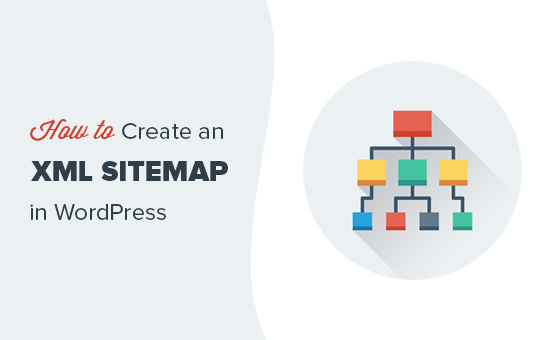
What Is an XML Sitemap? A Complete Beginner’s Guide
In the world of Search Engine Optimization (SEO), an Sitemap.xml plays a vital role in helping search engines understand and crawl your website effectively. Whether you run a small blog or a large eCommerce website, having a properly structured XML sitemap can significantly improve your site’s visibility in search results.
This article explains what an Sitemap.xml is, why it is important, how it works, its benefits, types, best practices, and how to create and submit one.
What Is an XML Sitemap?
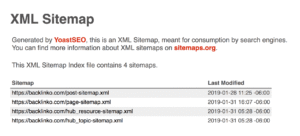
An XML sitemap is a file written in Extensible Markup Language (XML) that lists the important URLs of a website. It helps search engines like Google, Bing, and Yahoo discover, crawl, and index web pages more efficiently.
In simple words, an Sitemap.xml acts as a roadmap for search engines, telling them:
-
Which pages exist on your website
-
When those pages were last updated
-
How often they change
-
Which pages are more important
Why Is an XML Sitemap Important for SEO?
An Sitemap.xml is not a direct ranking factor, but it supports SEO indirectly by improving crawlability and indexation.
Key Reasons XML Sitemaps Matter:
-
Helps search engines find new pages quickly
-
Improves indexing of large or complex websites
-
Assists websites with poor internal linking
-
Ensures important pages are not missed
Without an Sitemap.xml, search engines may struggle to discover all your pages, especially if your site is new or has deep page structures.
How Does an XML Sitemap Work?
When you submit an Sitemap.xml to a search engine:
-
The search engine reads the sitemap file
-
It identifies all listed URLs
-
Bots crawl those URLs efficiently
-
Pages are indexed faster (if they meet quality guidelines)
It’s important to note that submitting a sitemap does not guarantee indexing, but it increases the chances.
XML Sitemap vs HTML Sitemap
Many beginners confuse Sitemap. XMLs with HTML sitemaps. They serve different purposes.
| Feature | XML Sitemap | HTML Sitemap |
|---|---|---|
| Target Audience | Search engines | Human users |
| Format | XML code | Web page |
| SEO Purpose | Crawling & indexing | User navigation |
Both can be used together for better SEO and user experience.
Types of XML Sitemaps
Depending on the content of your website, different types of Sitemap.xml can be created.
URL Sitemap
The most common type, listing all web pages of a site.
Image Sitemap
Helps search engines discover images, useful for image-based websites.
Video Sitemap
Used to index video content properly in search results.
News Sitemap
Designed for news websites to index time-sensitive content faster.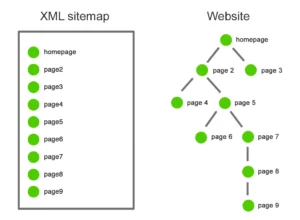
What Information Does an XML Sitemap Contain?
An Sitemap.xml includes several important tags:
<url>
Defines a single URL entry.
<loc>
The actual URL of the page.
<lastmod>
The last modification date of the page.
<changefreq>
How often the page changes (daily, weekly, monthly).
<priority>
Importance of the page (0.0 to 1.0).
Example:
Benefits of Using an XML Sitemap
Faster Indexing
New pages are discovered and indexed more quickly.
Better Crawl Budget Usage
Search engines focus on important pages instead of wasting crawl budget.
Improved SEO Performance
Ensures search engines don’t miss valuable content.
Helpful for Large Websites
Ideal for sites with thousands of pages.
Useful for New Websites
Helps new domains get indexed faster.
Who Needs an XML Sitemap?
An XML sitemap is recommended for:
-
New websites
-
Large websites (500+ pages)
-
eCommerce websites
-
Websites with weak internal linking
-
Sites with multimedia content
-
Blogs that publish frequently
Even small websites benefit from having one.
How to Create an XML Sitemap
Using WordPress Plugins
Popular plugins:
-
Yoast SEO
-
Rank Math
-
All in One SEO
These plugins automatically generate and update sitemaps.
Online Sitemap Generators
Tools like XML-Sitemaps.com generate sitemaps for small websites.
Manually Creating a Sitemap
Best for developers, but not recommended for beginners.
How to Submit an XML Sitemap to Google
Step-by-Step:
-
Open Google Search Console
-
Select your website property
-
Go to Sitemaps
-
Enter sitemap URL (e.g., sitemap.xml)
-
Click Submit
Once submitted, Google will start processing it.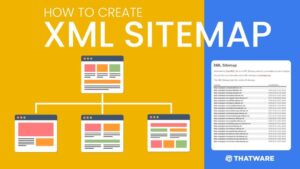
Best Practices for XML Sitemaps
To get the most SEO benefit, follow these best practices:
-
Include only indexable URLs
-
Avoid duplicate or thin content
-
Keep sitemap under 50,000 URLs
-
Use HTTPS URLs
-
Update sitemap automatically
-
Remove broken or redirected links
-
Use multiple sitemaps for large sites
Common XML Sitemap Errors to Avoid
-
Including
noindexpages -
Adding 404 or 301 URLs
-
Incorrect URL formats
-
Exceeding size limits
-
Not submitting sitemap to Search Console
Fixing these errors improves crawl efficiency.
Do XML Sitemaps Affect Rankings?
Directly: ❌ No
Indirectly: ✅ Yes
Sitemap.xml improve indexing, crawling, and visibility, which can lead to better rankings over time.
XML Sitemap and Robots.txt Relationship
Your sitemap URL should be added to the robots.txt file:
This helps search engines find it easily.
How Often Should You Update an XML Sitemap?
-
Blogs: Weekly or automatically
-
eCommerce sites: Daily
-
Static websites: Monthly
Using plugins ensures automatic updates.
Conclusion
An Sitemap.xml is a crucial SEO tool that helps search engines efficiently crawl and index your website. While it doesn’t guarantee rankings, it significantly improves discoverability, especially for new, large, or complex websites.
If you care about SEO success, creating and submitting an Sitemap.xml is not optional—it’s essential. Ensure your sitemap is clean, up-to-date, and error-free to maximize its benefits.
No responses yet